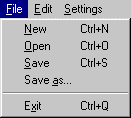
File Menu
Here you will find all of the usual options:
New (Ctrl+N)
This opens a new file in Dasher. If any changes have been made to the file that is currently open when this option is selected, you will be prompted as to whether you'd like to save the current file before creating a new file. The default settings for a new grid are 16 columns and 1 control box (8 rows). The columns are timed 1 second apart. Pressing the Control+N keys will also activate this option.
Open (Ctrl+O)
This opens an existing file in Dasher. If any changes have been made to the file that is currently open when this option is selected, you will be prompted as to whether you'd like to save the current file. Then Dasher opens a file selection window and allows you to select a DSH file. If the file you select is corrupted a warning message will appear and the file will not be loaded. Pressing the Control+O keys will also activate this option.
Save (Ctrl+S)
If the file that is currently open has a file name, it will simply be saved. If the currently open file does not, you will be prompted for a file name and the location where you'd like the file to be saved. Pressing the Control+S keys will also activate this option.
Save as...
When this is selected you will be prompted for a file name and the location where you'd like the file to be saved. If the currently open file already has a file name it will be used as the suggested file name.
Exit (Ctrl+Q)
This option exits Dasher. If any changes have been made to the file that is currently open when this option is selected, you will be prompted as to whether you'd like to save the current file before exiting. Pressing the Control+Q keys will also activate this option.