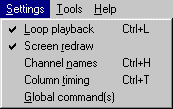
Settings Menu
NOTE: All of the following commands are toggled selections. This means if you select them and they are off they will be turned on. The opposite is also true (if they are on and you select them, they will be turned off). Another way to toggle these selections is to click on their indicators in the status bar of the main screen.
Loop playback (Ctrl+L)
If this is turned on, when the last column is finished playing, the grid as well as the audio file will rewind and start over. This option can be changed while the grid is playing.
If it isn't turned on the grid will play back and then stop.
Pressing the Control+L keys will also toggle this option.
Screen redraw
If this is turned on the current column header will be lighted during playback and the grid will scroll, allowing a person to follow the grid as it plays. Note that this does slow down playback.
Channel names (Ctrl+H)
When this is turned on and one clicks on one of the row headers, a box appears asking you to type in the name of the channel. To remove a channel name simply delete it's name from the box when prompted for a new name.
Pressing the Control+H keys will also toggle this option.
Column timing (Ctrl+T)
When this is turned on and one clicks on one of the column headers, a box appears asking you to type in the start time of the column. The timing of the columns is based on the timing of the audio file that plays.
The format of the string is as follows:
mm:ss.hh
where mm stands for minutes, ss stands for seconds, and hh stands for hundredths of a second.
Valid values for mm and hh are 00-99.
Valid values for ss are 00-59.
Each space in the string must be filled in. For example, if you wish to type in a "4", precede it with a "0", thus typing "04". Number separators can be any character you wish to type. All of the following examples are valid:
00:04.55
00.04.55
00a04b55
01004055If any part of the 3 number pairs are not valid numbers, the whole string will be rejected and no changes will be made. The following examples will be rejected:
0:04.55
0A:04.55
00:60.55 (Note: 60 is a valid number but is out of range in the seconds position)
00:04.&5Pressing the Control+T keys will also toggle this option.
Global command(s)
When this is turned on and one clicks anywhere in a column, the column header of that column will turn red if it isn't already red. Red denotes that this column contains a global command. If the column header is already red when one clicks on the column header, it will change color back to the system default, effectively removing the global command from the column.
If a column is set as a global command column, the setup of control boxes 2 and higher are ignored for that column. The configuration of control box 1 will be sent out to all the control boxes when this column is played, making all control boxes look like control box 1.
The most effective use of the global command is when you wish to turn everything on in your display or blackout (everything off) your display. Instead of sending commands to every control box this function sends one command, making the results fast and effective.